Configuration file editing
Sometimes you may need to edit RouteMaster VR's configuration file directly.
The configuration file is a JSON file, which can be edited with any text editor. We recommend Notepad++ or Visual Studio Code.
- For Desktop installations, the configuration file is typically located in the user's application directory
C:\Users\roddy\AppData\Roaming\Rascular\RouteMaster VR
- For Service installations, the configuration file is located here:
C:\Windows\SysWOW64\config\systemprofile\AppData\Roaming\Rascular\RouteMaster VR
The configuration file is named RouteMaster VR.ini.json.
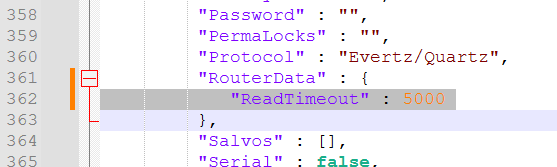
The most common change involves adding custom fields to a router's configuration.
Search within the "ROUTERS" section of the file ,looking for a "RouterData" section, near the "Protocol" field. If none is present, you can add it manually. Add any custom fields here, as instructed by Rascular.