Name Management
Name Management
RouteMaster VR allows you to edit Source, Destination and Level names to make it easier for users to locate signals. This is particularly useful when the router itself does not support names, or only supports short names.
RouteMaster VR names can be of any length, and can include Unicode characters.
RouteMaster VR will initially use names provided by the router. Any names specified in these tables will override the router's internal names. Names you provide here are then available to all connected clients.
Adding or modifying names in RouteMaster VR does not change the names stored in the physical router. RouteMaster VR will continually monitor the router for name changes, and propagate those to clients.
Editing Names in the Application UI
To edit names, open the Configure Routers dialog, select the router and choose one of the tabs for Source Names, Destination Names or Level Names.
Just type in the name you want in the fields to the right of the input, output or level, to override the default name. Indices and names from the router are shown in the left column.
The Filter box allows you to quickly find specific signals by name or number.
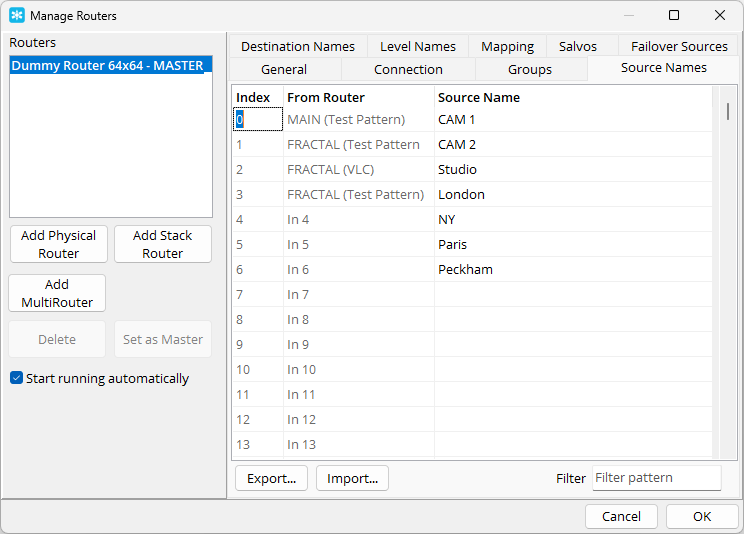
Name Table Import and Export
The name tables can be exported to and imported from CSV and JSON files. This allows you to edit names in a spreadsheet application, and also to share name tables between different RouteMaster VR systems.
When importing names from CSV files you can select which column to use for the names, signal that the file contains a header row headers, and specify the first column contains signal numbers the names being in sequence.
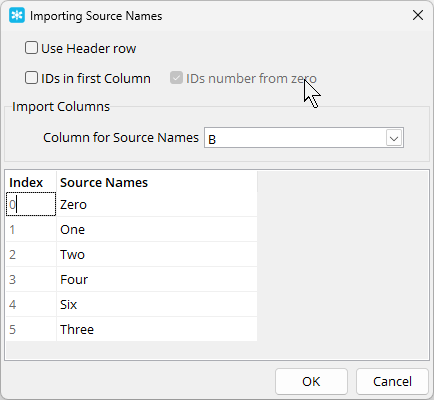
Here's an example of the JSON format for name tables.
[
   {
      "Index" : "0",
      "Router Source Name" : "MAIN (Test Pattern)",
      "Source Name" : "CAM 1"
   },
   {
      "Index" : "1",
      "Router Source Name" : "FRACTAL (Test Pattern 2)",
      "Source Name" : "CAM 2"
   },
   {
      "Index" : "2",
      "Router Source Name" : "FRACTAL (VLC)",
      "Source Name" : "Studio"
   }
]