Designing Web Panels
Warning
The content on this page is outdated and is currently being revised. Please check back soon for the latest information on designing web panels for RouteMaster VR using Helm Designer.
You can create your own custom web panels using Rascular’s Helm Designer software. The process is very simple. To get you started, here’s a very basic example:
Design your panel in Helm Designer
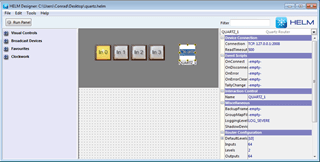
Here is the Helm panel we used when we were controlling RouteMaster VR from Helm directly. This time we'll publish this panel to RouteMaster VR as a Web Panel.
First let's check the settings
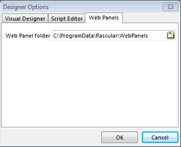
In Helm Designer select the Tools / Options... menu and make sure the Web Panels folder is set to the same path used by RouteMasters web server. Check the Configure Clients menu (Web Panels tab) to verify this.
Now Publish the panel
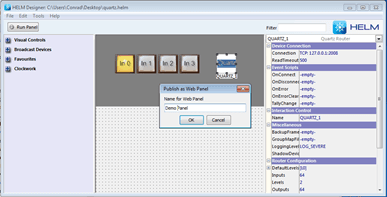
Select the File / Publish to... menu and give the Web Panel a name.
A folder called Demo Panel has been added in the RouteMaster VR web path
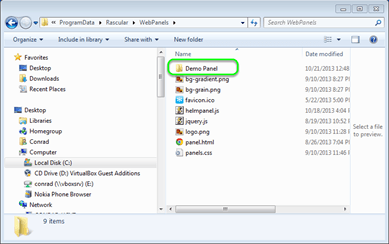
Each Web Panel you create has its own folder in the web panels path.
Now run RouteMaster VR
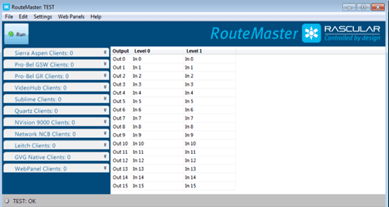
For the web server to be active RouteMaster VR must be open and in Run mode.
View web panels using the Web Panels menu
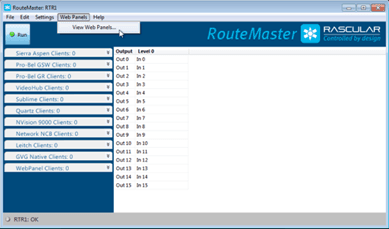
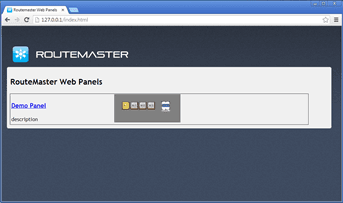
Or just type the IP address of RouteMaster VR in your browser (in this case 127.0.0.1 since we're on the same PC) and you'll see a page showing the available Web Panels. Click on Demo Panel to open it.
Switch crosspoints using your Web Panel
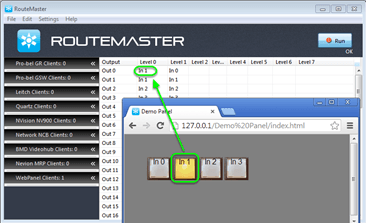
As you click the crosspoint buttons on your web panel you can see the input change in RouteMaster VR.
Helm controls that work with Web Panels
Although you can publish any Helm panel as a Web Panel, RouteMaster VR only supports the Helm components and features that are involved in router control.
These components are currently supported.
- Text Labels
- Images
- Router Buses
- Output Selectors
- Level Selectors
- Input Group Selectors
- Output Group Selectors
- Timers
- Indicators
- Text Fields
- Buttons
All visual properties of these components are supported, including customizable images, fonts, colours and transparency.
Scripting
Lua and standard Helm scripts is allowed in Web Panels. Javascript can also be used.