AJA Kumo
AJA Kumo routers can be controlled using Grass Valley Native protocol over TCP/IP from RouteMaster VR-VR.
Kumo routers only support a subset of GVG native commands. RouteMaster VR and Helm automatically detect Kumo routers, and adapt to only use the available commands.
Kumo control panels use an AJA proprietary protocol (NOT GVG Native) to control Kumo routers. Therefore - unlike many other compact router panels - it's not possible to use Kumo control panels to directly control RouteMaster VR systems.
When controlling Kumo routers, please note the following:-
Single Line names
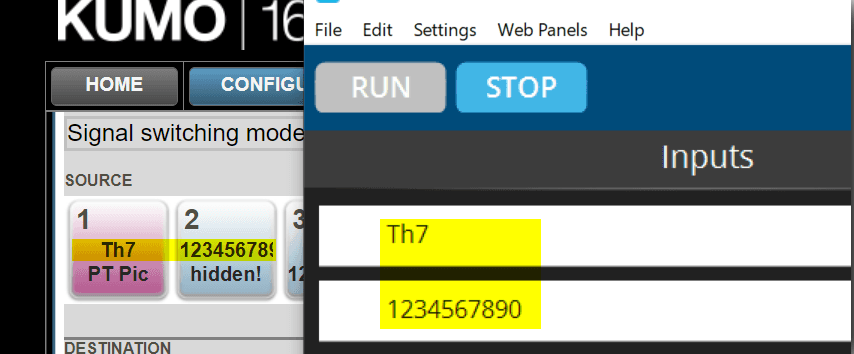
Kumo allows each source and destination to have a name split over two lines. However, only the top line is accessible via GVG Native, so the bottom line text is ignored.
Unique Names
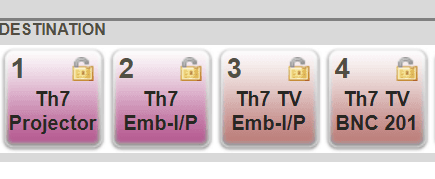
Source and Destinations must have unique names. And because of the single line issue above, the names MUST be unique on the top line. If the names are not unique, the router crosspoint status will not be correctly shown, and locking/unlocking destinations will not operate.
In the example below, Destinations 1 and 2 share identical top names, also 3 and 4. Don't do this!
One-based numbering
GVG Native protocol specifies the use of zero-based numbering for indexes, but KUMO uses one-based. RouteMaster VR uses zero-based numbering internally, so to compensate for this you should use RouteMaster VR's 'mapping' function as follows.
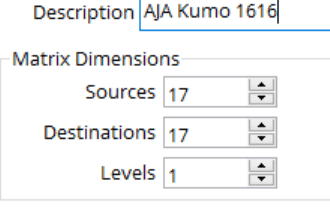
Set the router destinations and sources to be one more than the actual router size. So, for a KUMO1616 you would specify the physical size to be 17 x 17.
Use RouteMaster VR mapping controls to map a 16x16 router starting at source 1, destination 1.
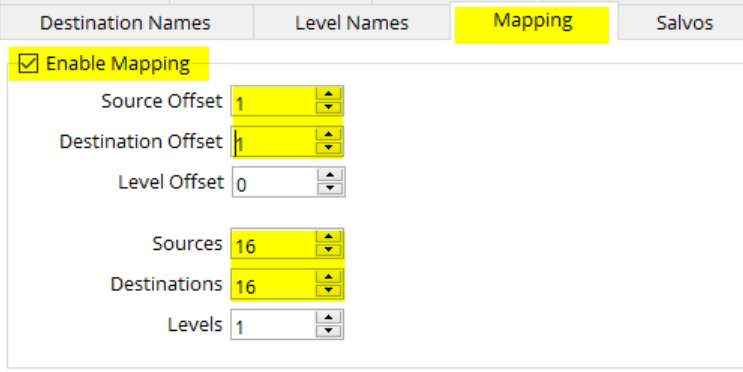
You can now control the router as a 16x16 router, with indices starting at zero.
Slow Tally at Start-up
When RouteMaster VR or Helm connects to a KUMO router the entire cross-point state can take a while to be retrieved - Typically one second per destination.
During this time cross-point status will not be accurately displayed. Similarly, if a destination is locked or unlocked by another control panel, this will not be immediately reflected in RouteMaster VR.