Groups
By arranging your inputs and outputs into named groups, you can make it easier for users to find the signals they need when using web panels.
The Grid Control UI allows you to filter inputs and outputs by group.
when building Web Panels, you can choose to show just specific groups of sources and destinations, and use Group Selector controls to allow users to switch instantly between groups.
These are used by Input and Output group selector controls on web panels.
Configuring Groups with the Application UI
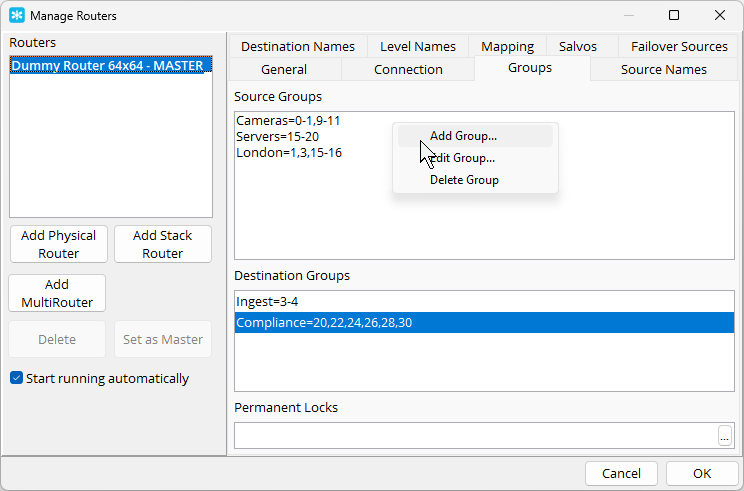
From the Configure Routers dialog, select the router and choose the Groups tab. Lists of Source and Destination groups are shown.
To add a group, right-click in the list and select Add Group.
You can then enter the group name, and select which inputs or outputs belong to the group. You can either tick individual signals from the list (also using the Filter box to find specific signals), or you can enter a comma-separated list of signal numbers and ranges (e.g. 1-4, 6, 8-10).
Signls in the group preserve the order in which they are defined, so a grou 99, 1-5 will show signal 99 first, followed by signals 1 to 5. You can use the Sort button to sort the signals back into numerical order.
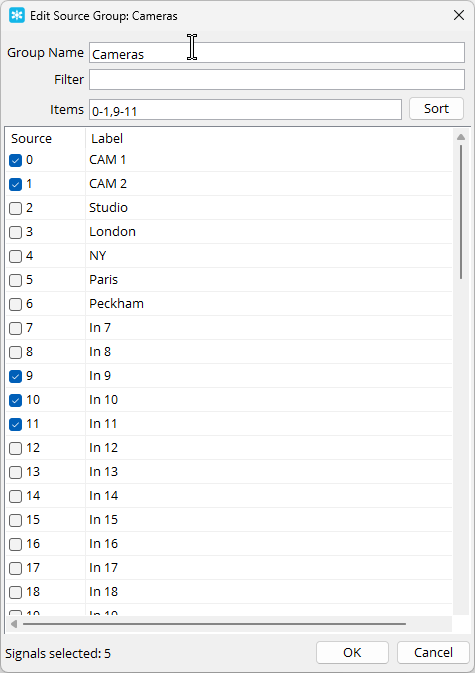
Editing and deleting groups is performed in the same way. You can also double-click a group to edit it.